Created with Canson Drawing 220 paper and Mepxy Brush Markers
Hello all and welcome to my last tutorial for 2015. I hope you enjoy it as much as I did creating it.
I start by using warm grey to shadow the deer's nostril. If you want to create the perception of depth you will want to shade the entire area with a light tone then go in close to the edge of the area you want depth with a darker tone.
I shade around the nose with some more lighter warm greys. I use warm grey as it's slightly brown more tan proper grey.
I start his nose by lightly shading with the lightest warm grey. I use browns to shade under the top lip to give shadow.
When shading the lower jaw I try to create some sort of muscle structure by shading a solid line just passed where it's mouth finishes.
Now comes the fur. I use a whipping motion to create the sort of spikey or furry effect I'm looking for. I continue this "pattern" all the way through the deer.
I hope you have enjoyed this tutorial and your 2015. Looking forward to creating more with you in 2016.
For one of my assessment pieces at University last year, I wanted to make a 2D animation and decided to create one using the Mepxy Markers.
I called it "Velma Pigglesworth Goes to Africa" which was a short animation of this crazy red haired girl taking photos of the animals she came across in her travels. It only went for 60 seconds, but was a lot of fun to make!
The animation included over 100 drawings which were created on Canson Bleedproof paper.
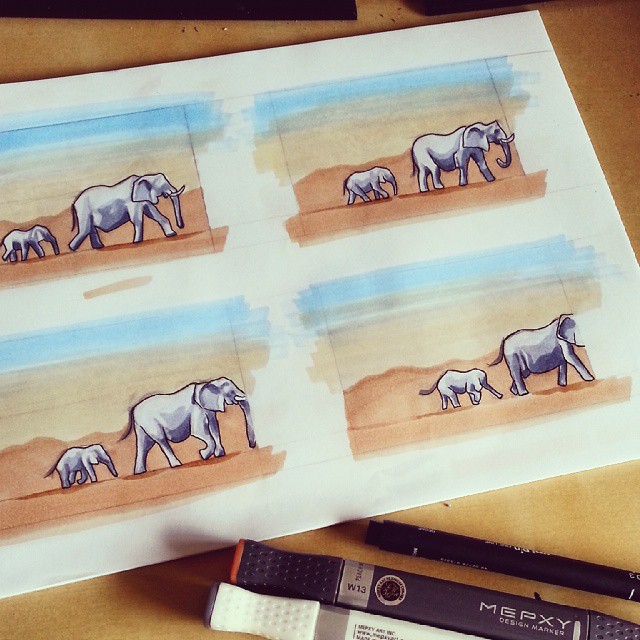
I started by ruling up 4 squares per page and then drew my sketch in pencil and then coloured using the Mepxy Markers and occasionally would finish with some pen detailing.
The markers I used for this work were:
The Basic 36 Brush Marker set
The Pastel Design Marker set.
And the Tonal Grey Brush Marker set.
Here are some of the concept art drawings I created for the animation.
Originally, the animation was going to be about a giraffe called Gerald... or Jeffery? I can't remember. But this was a sketch I created of the said giraffe!
I wanted to try some thumbnail sketches of backgrounds and these were so much fun to create!
Creating Velma Pigglesworth.
Looks like I gave her a swimsuit for the African Desert, guess I wasn't thinking practically ha-ha!
And here are some of the drawings I created for the animation:
My desk set-up!
Some of the first drawings.
Drawing the trees!
Velma being Velma!
The giraffe was probably my favourite character of them all!
The Leopard! I felt like Cruella DeVille with all the spots.
The Elephant and baby elephant which was so much fun to draw.
You can see how I wasn't afraid to draw over the edge of the boundaries in the square because I was going to crop it in the end.
More Elephants.
The Lion was a bit tricky to draw, but he was great in the end.
I used mainly three colours for the Elephants.
I had to extend the boundaries of my drawing in this one to get the detail in, but I just move the ratio of the squares.
The colours I used for the Gazelle.
All the drawings!
And now for the actual animation:
I used Adobe Flash, Final Cut X and GIMP to make the video.
Music is "Ah Zabenya" from The Lion King and "Sun" by "Jonsi". Various sound effects were added in Final Cut X.